Page 1 of 1
Auto-Installer not working
Posted: Thu Dec 03, 2020 5:27 pm
by aaroncampbell72
Initially, the auto-installer was working and then suddenly stopped. Error message in scripting log:
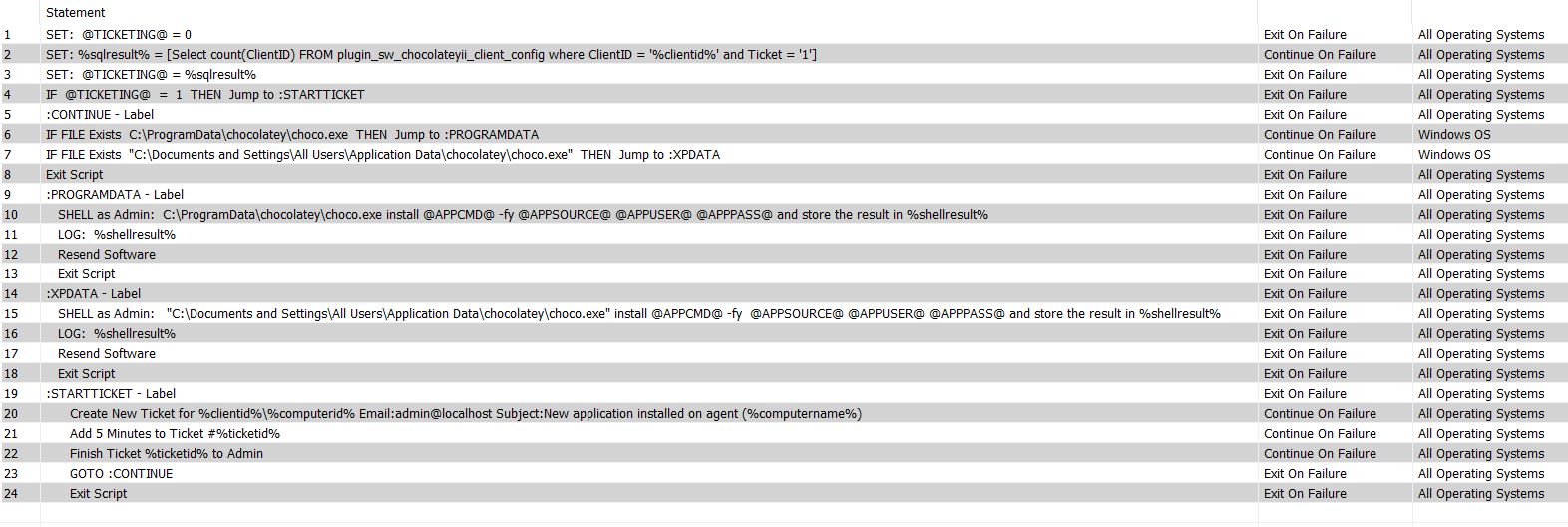
- Capture.JPG (169.74 KiB) Viewed 18128 times
Re: Auto-Installer not working
Posted: Thu Dec 03, 2020 5:28 pm
by aaroncampbell72
Additionally, here's the Installer Restuls:
The Script(6379) failed in the Then section at step 9. The reason: Kill command was issued.
Script: S6379 - Starting at Server Time: Wednesday, December 2, 2020 2:07:04 PM
IF F5 ValueOne (P1): APPCMD Comparer (P2): 3 ValueTwo (P3): T: 0.0155849
L1 F20 SetType(P1):1 Parameter(P2):0 VariableName(P3):TICKETING T: 0.0155849
L2 F172 SqlStatement (P1): 'Select count(ClientID) FROM plugin_sw_chocolateyii_client_config where ClientID = '55' and...' T: 0.0155849
L3 F20 SetType(P1):1 Parameter(P2):0 VariableName(P3):TICKETING T: 0.0311844
L4 F70 Value (P1): TICKETING Comparer (P2): 2 To (P3): 1 Jump (P4): :STARTTICKET T: 0.0321816
L5 F139 Note (P1): :CONTINUE T: 0.0321816
L6 F114 File (P1): 'C:\ProgramData\chocolatey\choc...' Check (P2): 0 Jump (P3): :PROGRAMDATA T: 0.0321816
Re: Auto-Installer not working
Posted: Mon Dec 07, 2020 2:26 pm
by Cubert
Your going to need to post more info than this. The script log is not showing errors and is just an excerpt of the script running the ticketing section of the script.
There should be a complete log on the LTHost for the plugin along with logs in the console and on the agents console script and command logs.
We will need them all to move forward with an issue.
Re: Auto-Installer not working
Posted: Fri Nov 13, 2026 5:09 am
by nathantaylor
The “Kill command was issued” line is worth focusing on: it can mean the script was terminated externally or timed out, rather than a normal Then-step failure. Check the agent script log around the same timestamp and the script’s timeout setting; if step 9 was waiting on the file or SQL check, that would fit. The full LTHost/plugin and agent logs are still needed, but this may help narrow where to look.