Page 1 of 1
ADMON Policies Question
Posted: Tue Mar 17, 2026 1:30 pm
by DustinG
We recently turn on ADMON for a client. When it generates a ticket in our PSA it says that the administrator group doesn't conform to current policies. Where in Automate are the policies configured? Thanks
Re: ADMON Policies Question
Posted: Tue Mar 17, 2026 2:25 pm
by Cubert
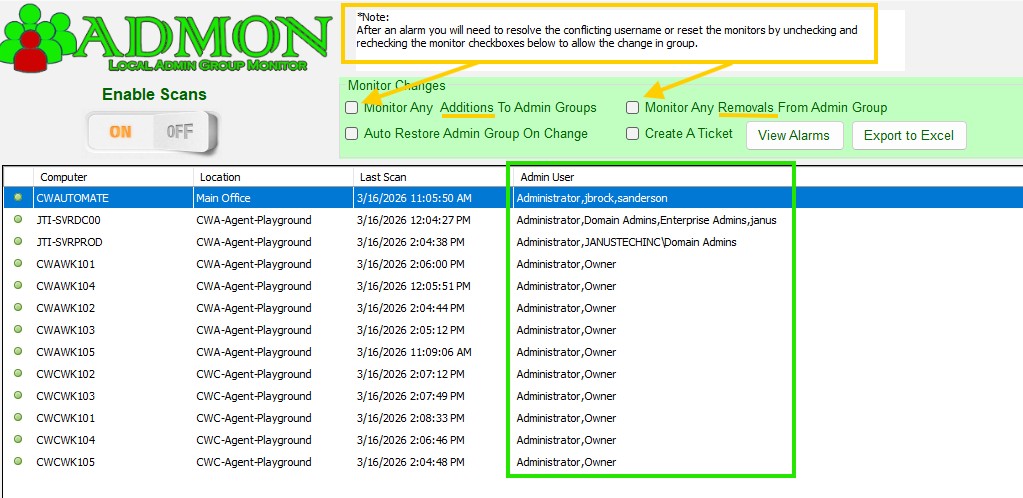
A policy is a snapshot of what the admin group looked like at the point you turned on monitoring. At that moment a snapshot of the group was taken for each computer and that snapshot is the "policy" used to determin if a user has been added or removed from that group.
The green box denotes what the policy is at the moment you enable monitoring as this is the current status of computer.
Well' How do I update this policy if something has changed but is valid?
Good question, You open up Admon, confirm that what you see in the admin display is accurate, if not go manage that computers group, execute the scripts/maintenance/Admon Maintenance Service script with the command "SCAN" to refresh the data in Automate, relaunch Admon and validate data for all listed agents is accurate then uncheck and recheck the 2 monitor rules to take a new snapshot of the current environment. The plugin will now watch for changes to this new snapshot alerting you when any computer devates from the known good snapshot. Either checkbox will force a policy update snapshot if box is cycled and you can have it only checking in one direction if desired. Alarms should should what users failed the policy test.
- group policy and updating them.jpg (137.72 KiB) Viewed 4281 times